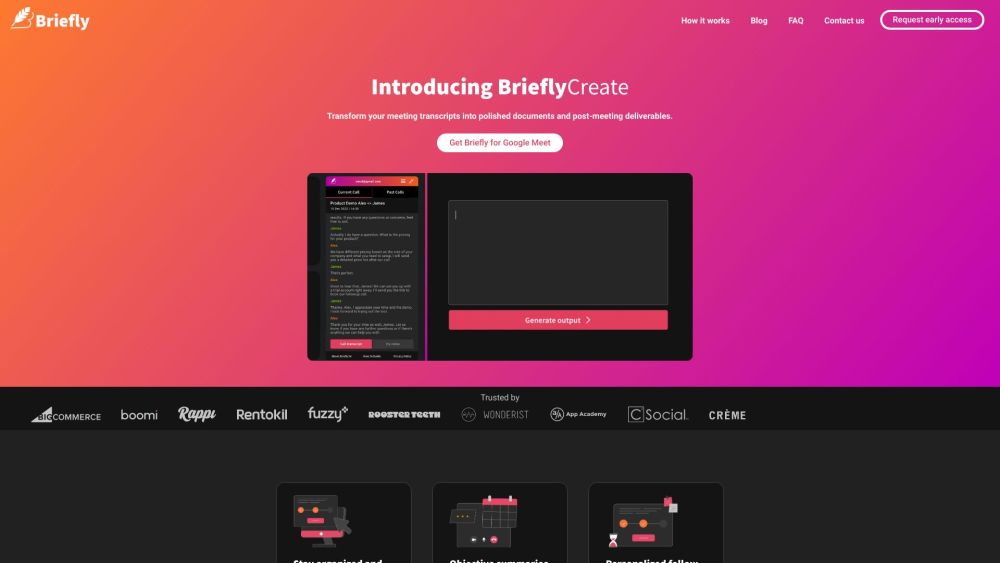
Briefly AI
Be present in meetings with AI-powered note-taking, summaries, and follow-up emails.
(3.0)
- Added on
- May 06 2023
- Monthly Visitors
- 6.1K
Description
What is Briefly AI?
BrieflyAI is an AI-powered tool that helps you be more present during meetings by taking notes for you and be more productive afterward by generating meeting summaries, action items, and automated follow-up emails. It transcribes your meetings, categorizes them based on content, and provides objective summaries, key insights, and personalized action items to save you time and effort.
How to use Briefly AI?
To use BrieflyAI, simply request early access on their website and download the Briefly for Chrome extension. Once installed, integrate it with your preferred video conferencing platform like Zoom or Teams. During your meetings, BrieflyAI automatically transcribes the conversations and categorizes them. After the meeting, you can access the transcripts, summaries, and notes in one place. You can also generate AI-powered follow-up emails based on the decisions made in the call.
Briefly AI Core Features
- Automated meeting transcriptions
- Objective summaries and takeaways
- Personalized follow-up emails
- Support for over 12 languages
- Access to all calls, summaries, and transcripts in one place
- Generate AI follow-up emails
FAQ from Briefly AI
BrieflyAI helps you focus on being present during meetings by automatically transcribing the conversations, categorizing them, and providing objective summaries. This frees you from the distraction of note-taking and allows you to capture important details and insights effortlessly.
After the meeting, BrieflyAI generates meeting summaries, key insights, and personalized action items, so you don't have to spend time combing through transcriptions to synthesize notes. It also offers the ability to generate AI-powered follow-up emails based on the discussions and decisions made in the call, leading to better engagement and response rates.
Yes, BrieflyAI supports integration with popular video conferencing platforms like Zoom and Teams. You can choose the platform that you commonly use and seamlessly use BrieflyAI's features during your meetings.
BrieflyAI supports over 12 languages, allowing you to capture transcriptions and generate AI summaries in the language spoken during your call. This ensures accessibility and usability across diverse language requirements.
BrieflyAI streamlines communication and collaboration in remote or hybrid work settings by automatically transcribing, categorizing, and summarizing meetings. This helps teams stay organized, align their efforts, make informed decisions, and enhance productivity regardless of their physical location or work arrangements.
Analytic
Estimated monthly visits
Traffic Sources
Top Country Shares
Alternative



Videos
Create ANYTHING With Replit AI Agents

How to Earn $240/Hour with ChatGPT For FREE
ChatGPT Tutorial: How to Use Chat GPT For Beginners 2024

How to Get Grammarly AI for FREE
How to Setup and Use Grammarly on Android
Articles

10 ChatGPT Prompts to Finish Hours of Work in Seconds
In the fast-paced digital world, efficiency is king. As professionals, we constantly seek ways to streamline our workflows and maximize productivity. Enter ChatGPT, an AI language model that can revolutionize how you approach your tasks. Here are ten prompts that can transform hours of work into seconds.
Read more
GPT-4o vs ChatGPT-4 vs Gemini vs Perplexity AI vs CoPilot
OpenAI’s launch of GPT-4o marks a significant milestone in the evolution of artificial intelligence technology. This new model, introduced in May 2024, builds on the foundations of its predecessors by integrating advanced multimodal capabilities that promise to revolutionize how we interact with machines.
Read more
7 Best Ways to Use ChatGPT Custom Instructions
Have you ever thought of customizing how ChatGPT, the most advanced conversational AI platform that has created its influence all over the world, responds to your queries? Whether your ChatGPT responses are more aligned with your role, tone, style, or goals, making them more engaging and appealing, If yes, then you are in benefit because of ChatGPT’s new feature that lets people do that, which is the ChatGPT custom instructions.
Read more
How To Use ChatGPT To Make Money in the Stock Market
Artificial intelligence is creating waves in the technology world. Many industries use ChatGPT to automate monotonous and tedious tasks, and you can use ChatGPT To Make Money in the Stock Market.
Read more
10 Best ChatGPT Plugins You Should Use
ChatGPT is a Natural Language Processing tool released by OpenAI in 2023. Almost like a human, this tool can interact with the person by its ability to answer follow-up questions, admit mistakes, correct responses challenge incorrect premises, reject inappropriate requests, and much more. With these abilities, ChatGPT has become a very powerful and popular tool for a wide range of applications.
Read more